SMS Marketing Tools for Pet Businesses Reviewed
Texting is the top way to reach pet parents. We review the best SMS tools for groomers and pet pros.
%20SMS%20Marketing%20Tools%20for%20Pet%20Businesses%20Reviewed.avif)
Here’s a number that should get your attention: text messages have a 98% open rate. Email averages around 20%. Social media posts? You’re lucky if 5% of followers even see them.
For pet businesses, SMS isn’t just effective — it’s becoming essential. Your clients are busy pet parents. They may miss an email, but they will absolutely see a text.
We evaluated SMS tools specifically for pet grooming businesses, focusing on cost, ease of use, and — most importantly — whether they actually improve client communication.
Why SMS Matters for Groomers
Before diving into tools, here’s how communication channels compare:
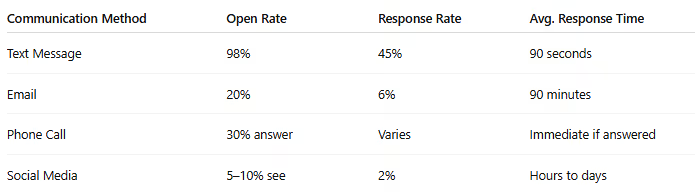
For appointment reminders, rebooking prompts, and time-sensitive updates, nothing beats text.
The No-Show Impact
Groomers using text reminders report:
- 40–60% fewer no-shows
- At $75 per appointment, reducing no-shows from 10% to 4% can save $6,000+ annually
SMS often pays for itself through no-show reduction alone.
SMS Options for Pet Businesses
There are three primary approaches:
- All-in-one grooming software with built-in SMS
- Standalone SMS marketing platforms
- Personal phone texting (manual approach)
Let’s evaluate each.
Option 1: Grooming Software with Built-In SMS
The most streamlined solution — scheduling, client management, and texting in one system.
Teddy
SMS Model: Unlimited texting included
Teddy stands out for groomers who prioritize communication. Every plan includes unlimited text messaging — no per-message fees and no caps.
What You Can Do
- Automated appointment reminders
- Scheduling change notifications
- Rebooking prompts
- Two-way texting conversations
- Broadcast messages to client groups
Why Unlimited Messaging Matters
Most groomers send 15–30 texts per day.
At $0.05–$0.15 per message (industry average), that’s:
- $25–$135 per month in texting fees
With Teddy, it’s included.
Real-world feedback:
“I actually text clients now instead of avoiding it because of cost. My communication improved dramatically.” — Mobile groomer, Texas
MoeGo
SMS Model: Per-message pricing (~$0.05–$0.10 per message)
Strong overall platform, but messaging costs accumulate quickly for communication-heavy businesses.
Example Calculation
- 25 texts per day
- 22 working days
- 550 texts per month
- At $0.07/text = $38.50 per month
This is in addition to software subscription fees.
Gingr
SMS Model: Add-on or limited messaging
Requires additional setup and often third-party integration. Adds cost and complexity.
DaySmart
SMS Model: Add-on with message limits
Offers basic reminder functionality but limited robust two-way conversation features.
Built-In SMS Comparison
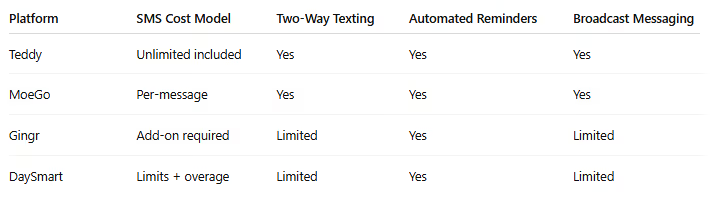
Overall Winner: Teddy
Unlimited messaging removes the mental barrier to communication. When you’re not worrying about per-text costs, you communicate more — and better communication improves retention and reduces no-shows.
Option 2: Standalone SMS Platforms
If your current software lacks strong SMS functionality, you can add a separate texting platform.
Twilio
Pricing: Pay-as-you-go (~$0.0079 per message + phone number costs)
Powerful but technical. Often requires custom setup or developer assistance.
Best For: Tech-savvy groomers building custom systems
Drawback: No user-friendly interface out of the box
SimpleTexting
Pricing: Starting at $29/month for 500 messages
User-friendly with templates and scheduling tools.
Best For: Promotional campaigns and marketing blasts
Drawback: Separate from scheduling system
EZTexting
Pricing: Starting at $20/month for 200 messages
Affordable for low-volume users.
Best For: Occasional promotional texts
Drawback: Message limits make daily reminders impractical
TextMagic
Pricing: Pay-as-you-go (~$0.04 per message)
Clean interface suitable for appointment reminders.
Best For: Adding SMS to existing workflows
Drawback: Another platform to manage
Verdict on Standalone SMS
Standalone platforms work for occasional promotions. But for daily reminders and client conversations, managing separate systems creates friction.
When texting lives outside your scheduling software:
- Client data must be synced manually
- You juggle multiple logins
- Communication often gets neglected
Integrated systems are more efficient long-term.
Option 3: Personal Phone Texting
Many groomers still text clients from their personal phone.
It works — but it doesn’t scale.
Problems
- Work/life boundaries blur
- No automation
- Difficult to scale
- No record inside your business system
- No booking links or structured templates
Acceptable When
- You’re just starting
- You have under 20 active clients
Time to Upgrade
- 50+ active clients
- You want automation
- You want professional communication systems
SMS Features That Actually Matter
Based on groomer feedback, these deliver the most impact:
1. Automated Appointment Reminders
Impact: Massive
Send at 48 hours and 24 hours before appointments.
2. Two-Way Conversations
Impact: High
Clients need to reply, ask questions, and request changes.
3. Rebooking Automation
Impact: High
“It’s been 6 weeks since Max’s last groom — ready to schedule?”
These fill schedules automatically.
4. Media Sharing
Impact: Moderate
Before-and-after photos delight clients and encourage sharing.
5. Broadcast Messaging
Impact: Moderate
Holiday closures, last-minute openings, promotions.
6. Templates
Impact: Moderate
Pre-written messages for common situations save time.
What SMS Looks Like in Practice
A moderately busy groomer might send:
Automated Messages
- 48-hour reminder
- 24-hour reminder
- Thank you + rebooking prompt
- “Time to schedule” follow-ups
Manual Messages
- Arrival notifications (mobile groomers)
- Schedule changes
- Client questions
- Photo sharing
- Holiday announcements
Typical Monthly Volume
400–800 messages per month.
At per-message pricing, that’s $20–$80 monthly just for basic communication — which is why unlimited plans provide predictable value.
Compliance and Best Practices
SMS marketing is regulated. Follow these rules.
Legal Requirements
- Obtain consent before texting
- Provide opt-out option for marketing messages
- Identify your business
- Avoid texting before 8 AM or after 9 PM
Best Practices
- Keep messages short
- Include your business name
- Make the call-to-action clear
- Avoid over-texting
- Personalize with pet names when possible
Setting Up SMS for Your Grooming Business
Starting Fresh
Choose grooming software with strong built-in SMS — we recommend Teddy for the unlimited messaging alone. Set up automated reminders and you’re immediately improving communication.
Using Software Without Good SMS
Evaluate whether switching platforms makes sense. If not, add a standalone SMS tool for marketing and use basic reminders within your current system.
Using Your Personal Phone
This should be temporary. At minimum, get a dedicated business number. Ideally, move to grooming software with integrated messaging.
ROI Calculation
Let’s run the numbers.
Scenario:
30 appointments per week
$75 average ticket
Without SMS
- 10% no-show rate = 3 missed appointments
- $225 lost weekly
- $11,700 lost annually
With SMS
- 4% no-show rate = 1.2 missed appointments
- $90 lost weekly
- $4,680 lost annually
Annual Savings: $7,020
Even the most expensive SMS tools cost far less than $7,000 per year.
The math is clear.
Final Recommendation
For most groomers, the smartest solution is grooming software with unlimited SMS built in.
Teddy is our top recommendation specifically because of its unlimited texting model. You’ll communicate more effectively when you’re not tracking cost per message.
Pay-per-text systems and separate platforms introduce friction. Friction reduces communication. Reduced communication increases no-shows and weakens client relationships.
Invest in communication. Your schedule — and your revenue — depends on it.









































.avif)