Comparing the Top Grooming Software Platforms in 2026
Compare top grooming software side by side—features, pricing, and real user reviews.
%20Comparing%20the%20Top%20Grooming%20Software%20Platforms%20in%202026.avif)
Choosing grooming software feels like a bigger decision than it should be. Once your client data, booking history, and payment records are inside a system, switching becomes painful.
We reviewed the major platforms, spoke with groomers using them daily, and compared the features that truly impact real-world operations.
Here’s what we found.
What We’re Comparing
Every grooming software claims to do everything. In reality, execution varies.
We focused on the features that matter most:
- Scheduling and booking – The core function
- Client management – Pet profiles, notes, history
- Communication – Reminders and two-way messaging
- Payments – Processing and invoicing
- Pricing – What you actually pay (including hidden costs)
- Ease of use – Learning curve and daily workflow
Teddy
Teddy started as an AI receptionist for pet businesses and evolved into a full scheduling and management platform. It’s newer to the market but has built a loyal following.
What It Does Well
- Unlimited texting included in all plans
- Clean, modern interface
- Fast onboarding — many users set up same-day
- Smooth online booking flow
Unlimited texting is a major differentiator. Many groomers send 50–100+ texts per week. Per-text charges can quietly add $50–$80+ per month on other platforms.
Client Feedback We Heard
- “I switched because texting fees were getting out of control.”
- “Even my older clients can book without calling me.”
- “Reminders actually go out reliably.”
Considerations
- Fewer third-party integrations compared to older platforms
- Feature set is growing but may not match every advanced enterprise feature
Pricing
Competitive monthly pricing. Unlimited texting included. Square integration supported.
Best For
Solo groomers and small teams who want simplicity and predictable costs.
MoeGo
MoeGo offers a comprehensive feature set designed for both salon and mobile groomers.
What It Does Well
- Route optimization for mobile groomers
- Advanced staff management tools
- Commission tracking and performance metrics
- Detailed reporting and analytics
Client Feedback We Heard
- “Routing saves me real driving time.”
- “There are a lot of features — maybe more than I need.”
- “Support has been responsive.”
Considerations
- Steeper learning curve
- Some groomers feel they’re paying for features they don’t fully use
- Per-text charges may apply depending on plan
Pricing
Higher price point than simpler platforms.
Best For
High-volume mobile groomers and multi-groomer shops needing staff management tools.
DaySmart (formerly 123Pet)
DaySmart (formerly 123Pet) serves the broader pet services industry.
What It Does Well
- Mature, established infrastructure
- Multi-location support
- Extensive client database capabilities
- Wide range of integrations
Client Feedback We Heard
- “It works. Not flashy, but reliable.”
- “The interface feels dated.”
- “Support can be slow.”
Considerations
- Older interface compared to newer competitors
- Updates tend to roll out slowly
- Mobile app not as polished as desktop experience
Pricing
Mid-range with multiple tiers.
Best For
Established businesses prioritizing stability and multi-location operations.
Gingr
Gingr supports grooming, boarding, daycare, and training businesses.
What It Does Well
- Strong multi-service integration
- Customer portal for self-service booking
- Works well for mixed-service pet care facilities
Client Feedback We Heard
- “One system for grooming and daycare simplifies operations.”
- “Grooming features are solid, but not as deep as grooming-only software.”
Considerations
- If you only groom, you’re paying for unused features
- Higher price justified mainly for multi-service operations
Pricing
Higher price tier.
Best For
Businesses offering grooming alongside daycare, boarding, or training.
Square Appointments
Square Appointments is not grooming-specific, but many groomers use it — especially those already using Square for payments.
What It Does Well
- Free basic tier
- Seamless payment integration
- Simple setup
- Flexible for appointment-based businesses
Client Feedback We Heard
- “Hard to beat free.”
- “I work around grooming-specific limitations.”
- “Payments just sync automatically.”
Considerations
- No pet-specific profiles
- No vaccination tracking
- No grooming-specific reporting
You may need workarounds or separate systems.
Pricing
Free tier available. Paid upgrades add features like no-show protection.
Best For
New groomers minimizing costs or businesses already committed to Square.
Feature Comparison
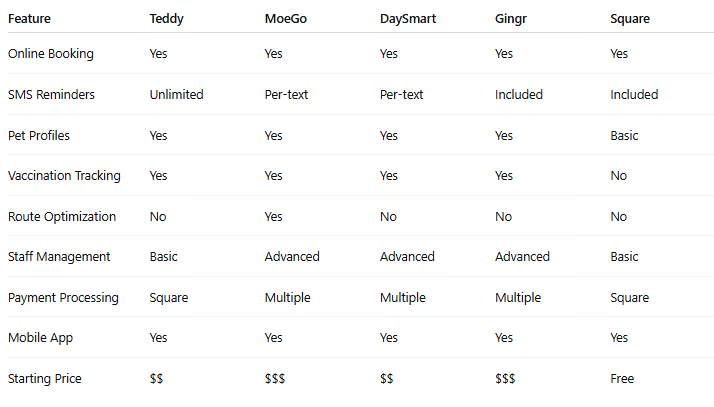
What Matters Most in Daily Operations
Based on our research, these factors have the biggest impact:
Reliability
If the system goes down during business hours, it’s a problem. Stability matters more than flashy features.
Communication
Automated reminders reduce no-shows. Two-way texting strengthens relationships. This is where daily ROI lives.
Ease of Booking
How many clicks does it take to schedule or reschedule? Small friction compounds over hundreds of appointments.
Payment Integration
Taking payment should be seamless and synced with your records.
Learning Curve
You’re a groomer — not a software engineer. Complexity must justify itself.
Making the Right Choice
Before committing, ask yourself:
What’s Your Real Budget?
Factor in:
- Per-text fees
- Add-on modules
- Payment processing rates
- Future price increases
What Features Do You Truly Need?
- Mobile routing is useless in a fixed salon.
- Advanced staff management is overkill for solo groomers.
Avoid paying for tools you won’t use.
How Comfortable Are You With Tech?
Feature-rich platforms require time to master. Simpler platforms trade depth for usability.
What’s Your Growth Plan?
- Planning to hire soon? Choose something that scales.
- Staying solo? Don’t overpay for enterprise tools.
Can You Test It First?
Most platforms offer free trials.
Use them seriously:
- Book test appointments
- Send reminders
- Process sample payments
- Explore reporting
See how it feels during real workflows.
Our Take
There’s no universal “best” grooming software. The right choice depends on your operation.
- Want simplicity and predictable costs? Teddy is strong for solo groomers and small teams.
- Need mobile routing? MoeGo delivers real value.
- Offer multiple services? Gingr makes sense.
- Bootstrapping? Square’s free tier is hard to ignore.
- Prioritize longevity and stability? DaySmart’s established presence offers continuity.
Choose intentionally. Switching later is possible — but painful.
Frequently Asked Questions
Can I switch software after I’ve started?
Yes, but it’s disruptive. Most platforms allow data export, but importing into a new system takes time and may lose formatting or notes. Choosing carefully upfront saves headaches.
Are there hidden fees?
Common hidden costs include:
- Per-text messaging fees
- Add-on modules
- Overage charges
- Payment processing differences
- Price increases after promotions
Always read the fine print.
Do I need grooming-specific software?
Not strictly. General appointment tools work. But most groomers appreciate pet profiles, vaccination tracking, and industry-specific reporting.
How long does onboarding take?
- Simple systems: 1–2 hours setup, a few days to feel comfortable
- Complex systems: Several hours setup, weeks to fully optimize
What if the company goes out of business?
It’s a valid concern — especially with smaller companies.
Protect yourself by:
- Confirming data export options
- Keeping periodic backups
- Avoiding long-term contracts without clear terms
Established companies carry lower risk — often at higher cost.
Choosing grooming software isn’t glamorous — but it’s foundational. The right platform quietly improves every day of your business.




































.avif)